Deploying The Arcadia App
In this lab. Arcadia App will be used as test application that will be protected by NGINX App Protect.
About Arcadia App. Architecture
Note
This application is available in Arcadia App GitLab repository
This is the architecture of Arcadia apps. It has 4 micro-services:
Main App
Backend
Money transfer
Refer friend
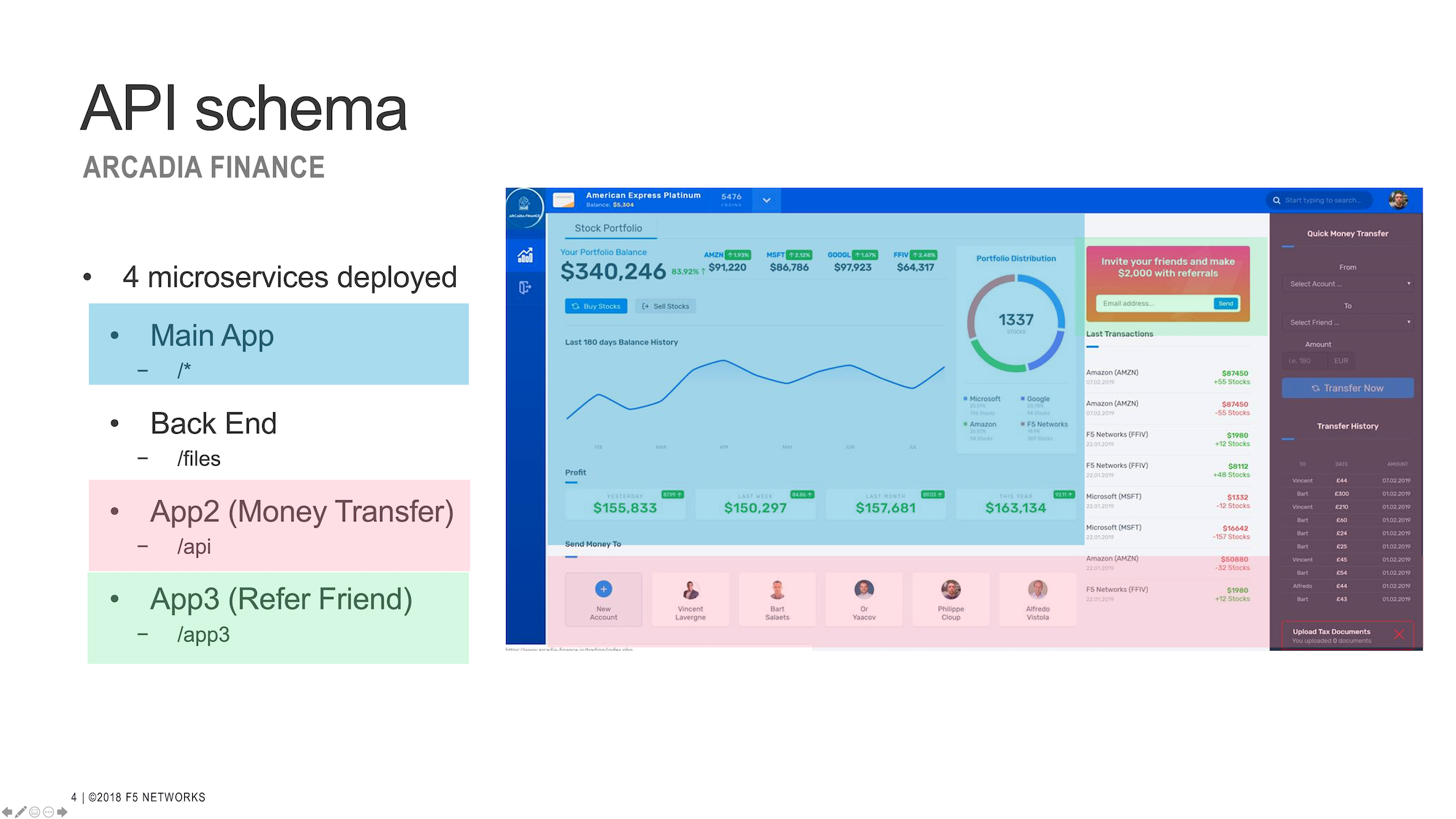
This is what displayed when only main and backend services are deployed.
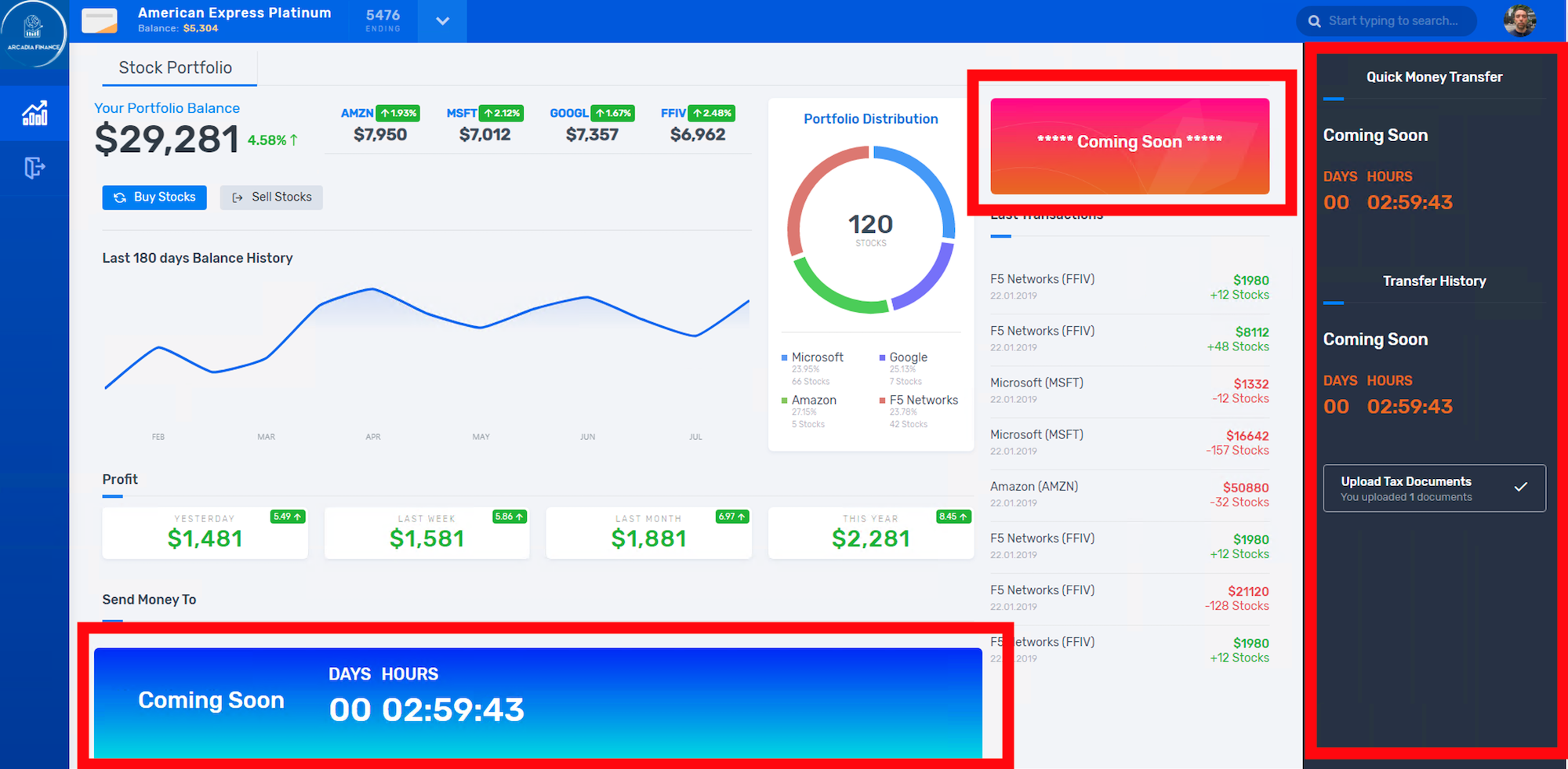
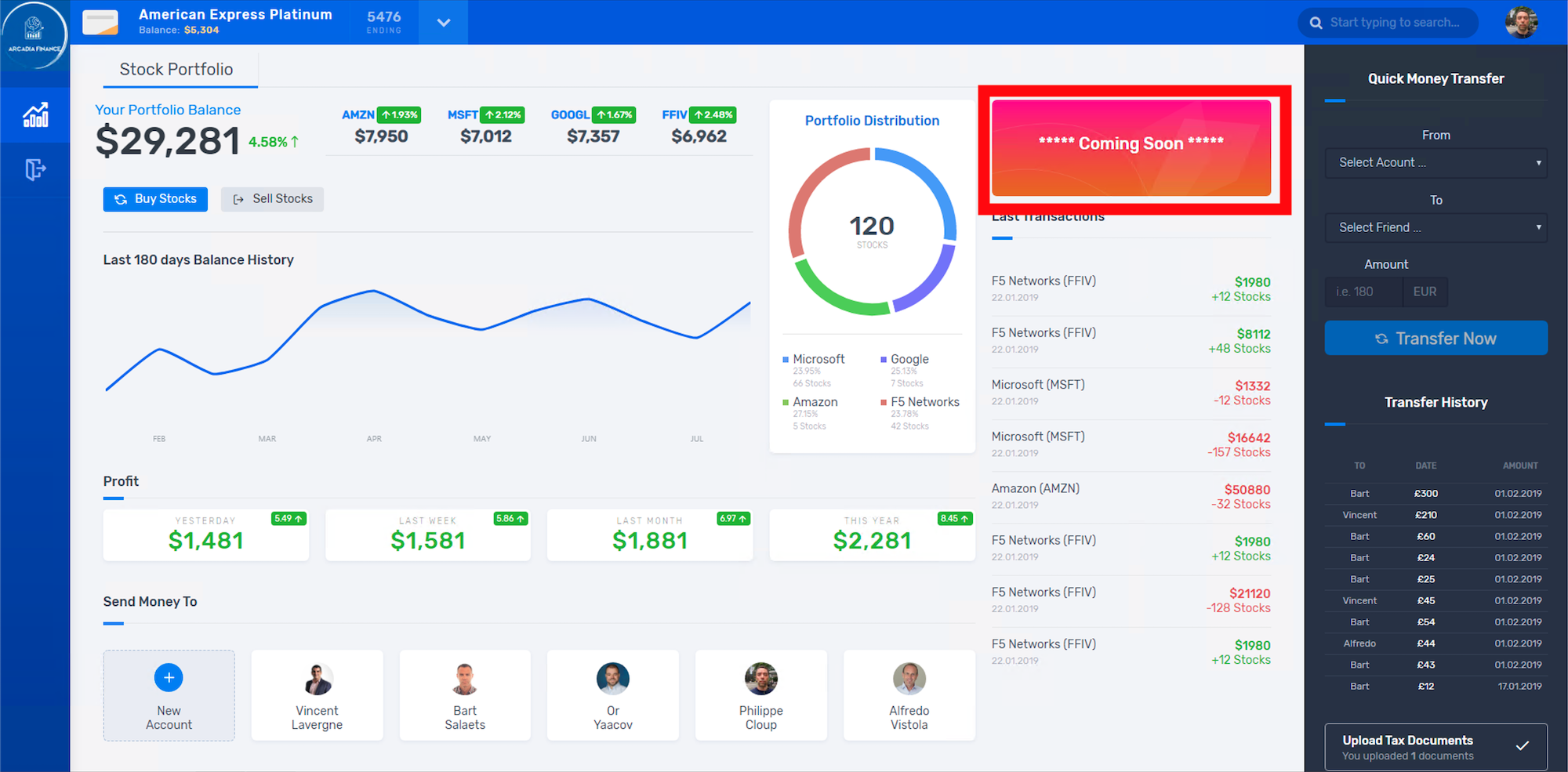
This is what displayed when main, backend and money transfer services deployed.
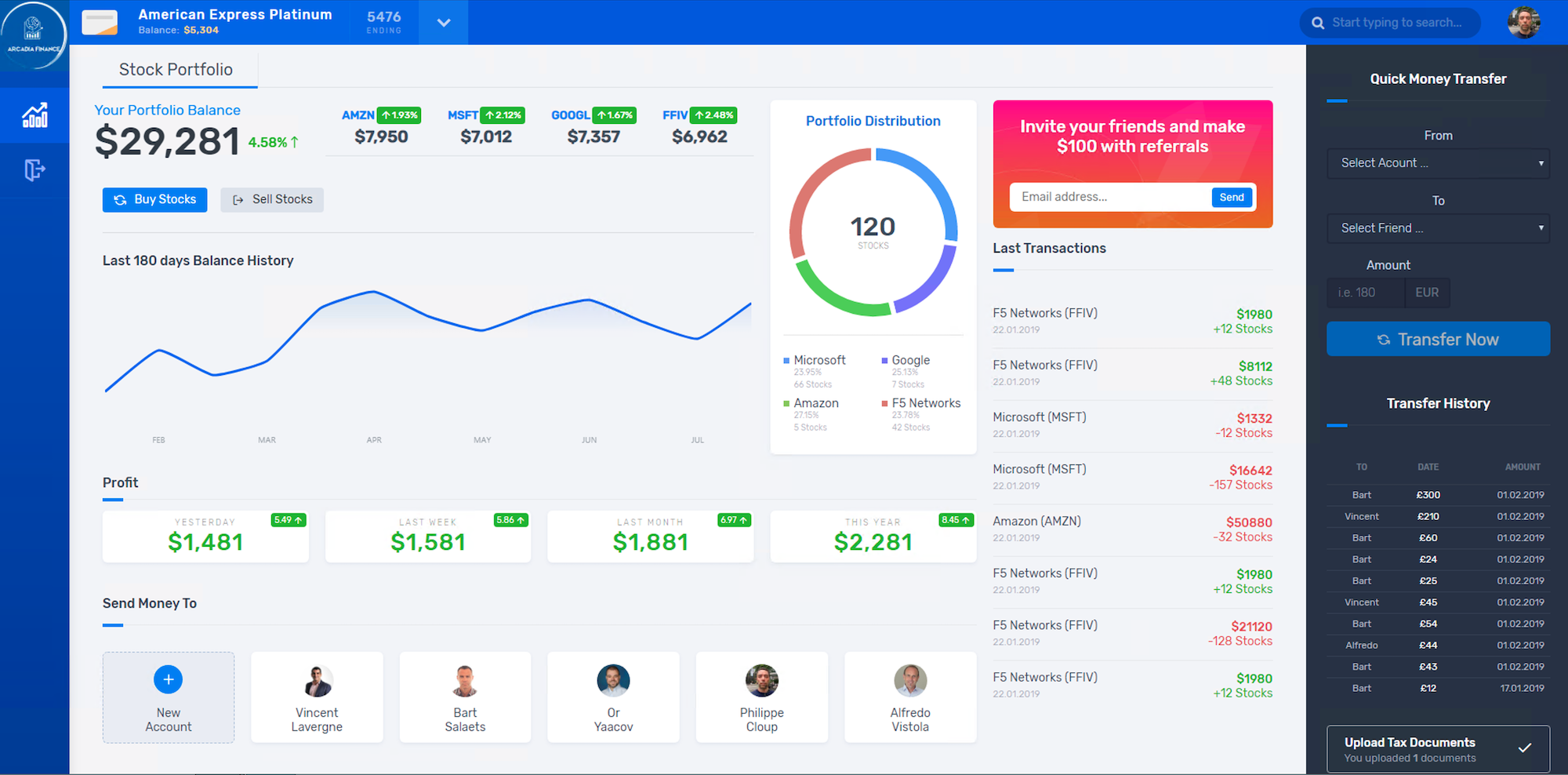
This is what displayed when main, backend, money transfer and referral services deployed.
Deploy Arcadia Apps In Kubernetes
Note
This already installed in your lab. deployment.
You can moving forward to Verify the Arcadia apps step.
Or else you can start over by execute below command under /home/ubuntu/arcadia:
$ kubectl delete -f app.yaml
$ kubectl delete -f vs-1.yaml
Login in APP node then change dir to /home/ubuntu/arcadia directory:
$ cd /home/ubuntu/arcadia
This app.yaml file define all the required resource to deploy Arcadia App in k3s
  1##################################################################################################
  2# FILES - BACKEND
  3##################################################################################################
  4apiVersion: v1
  5kind: Service
  6metadata:
  7  name: backend
  8  labels:
  9    app: backend
 10    service: backend
 11spec:
 12  type: NodePort
 13  ports:
 14  - port: 80
 15    nodePort: 31584
 16    name: backend-80
 17  selector:
 18    app: backend
 19---
 20apiVersion: apps/v1
 21kind: Deployment
 22metadata:
 23  name: backend
 24  namespace: default
 25  labels:
 26    app: backend
 27    version: v1
 28spec:
 29  replicas: 1
 30  selector:
 31    matchLabels:
 32      app: backend
 33      version: v1
 34  template:
 35    metadata:
 36      labels:
 37        app: backend
 38        version: v1
 39    spec:
 40      containers:
 41      - env:
 42        - name: service_name
 43          value: backend
 44        image: registry.gitlab.com/arcadia-application/back-end/backend:latest
 45        imagePullPolicy: IfNotPresent
 46        name: backend
 47        ports:
 48        - containerPort: 80
 49          protocol: TCP
 50---
 51##################################################################################################
 52# MAIN
 53##################################################################################################
 54apiVersion: v1
 55kind: Service
 56metadata:
 57  name: main
 58  namespace: default
 59  labels:
 60    app: main
 61    service: main
 62spec:
 63  type: NodePort
 64  ports:
 65  - name: main-80
 66    nodePort: 30511
 67    port: 80
 68    protocol: TCP
 69    targetPort: 80
 70  selector:
 71    app: main
 72---
 73apiVersion: apps/v1
 74kind: Deployment
 75metadata:
 76  name: main
 77  namespace: default
 78  labels:
 79    app: main
 80    version: v1
 81spec:
 82  replicas: 1
 83  selector:
 84    matchLabels:
 85      app: main
 86      version: v1
 87  template:
 88    metadata:
 89      labels:
 90        app: main
 91        version: v1
 92    spec:
 93      containers:
 94      - env:
 95        - name: service_name
 96          value: main
 97        image: registry.gitlab.com/arcadia-application/main-app/mainapp:latest
 98        imagePullPolicy: IfNotPresent
 99        name: main
100        ports:
101        - containerPort: 80
102          protocol: TCP
103---
104##################################################################################################
105# APP2
106##################################################################################################
107apiVersion: v1
108kind: Service
109metadata:
110  name: app2
111  namespace: default
112  labels:
113    app: app2
114    service: app2
115spec:
116  type: NodePort
117  ports:
118  - port: 80
119    name: app2-80
120    nodePort: 30362
121  selector:
122    app: app2
123---
124apiVersion: apps/v1
125kind: Deployment
126metadata:
127  name: app2
128  namespace: default
129  labels:
130    app: app2
131    version: v1
132spec:
133  replicas: 1
134  selector:
135    matchLabels:
136      app: app2
137      version: v1
138  template:
139    metadata:
140      labels:
141        app: app2
142        version: v1
143    spec:
144      containers:
145      - env:
146        - name: service_name
147          value: app2
148        image: registry.gitlab.com/arcadia-application/app2/app2:latest
149        imagePullPolicy: IfNotPresent
150        name: app2
151        ports:
152        - containerPort: 80
153          protocol: TCP
154---
155##################################################################################################
156# APP3
157##################################################################################################
158apiVersion: v1
159kind: Service
160metadata:
161  name: app3
162  namespace: default
163  labels:
164    app: app3
165    service: app3
166spec:
167  type: NodePort
168  ports:
169  - port: 80
170    name: app3-80
171    nodePort: 31662
172  selector:
173    app: app3
174---
175apiVersion: apps/v1
176kind: Deployment
177metadata:
178  name: app3
179  namespace: default
180  labels:
181    app: app3
182    version: v1
183spec:
184  replicas: 1
185  selector:
186    matchLabels:
187      app: app3
188      version: v1
189  template:
190    metadata:
191      labels:
192        app: app3
193        version: v1
194    spec:
195      containers:
196      - env:
197        - name: service_name
198          value: app3
199        image: registry.gitlab.com/arcadia-application/app3/app3:latest
200        imagePullPolicy: IfNotPresent
201        name: app3
202        ports:
203        - containerPort: 80
204          protocol: TCP
Let’s apply the app.yaml manifest above:
$ kubectl apply -f app.yaml
Verify Arcadia Apps Deployment
$ kubectl get pods,svc
NAME                           READY   STATUS    RESTARTS        AGE
pod/app2-6999bc5c98-lfbzj      1/1     Running   2 (4h26m ago)   39h
pod/syslog-56d66bfffc-ftql6    1/1     Running   2 (4h26m ago)   38h
pod/local-registry             1/1     Running   3 (4h26m ago)   39h
pod/main-66767686d9-xw9br      1/1     Running   2 (4h26m ago)   39h
pod/backend-78c5979444-9k7rf   1/1     Running   2 (4h26m ago)   39h
pod/app3-554b8c45d5-8mlsv      1/1     Running   2 (4h26m ago)   39h

NAME                     TYPE        CLUSTER-IP      EXTERNAL-IP   PORT(S)        AGE
service/kubernetes       ClusterIP   10.43.0.1       <none>        443/TCP        39h
service/local-registry   ClusterIP   10.43.3.5       <none>        5000/TCP       39h
service/backend          NodePort    10.43.248.112   <none>        80:31584/TCP   39h
service/main             NodePort    10.43.136.176   <none>        80:30511/TCP   39h
service/app2             NodePort    10.43.66.125    <none>        80:30362/TCP   39h
service/app3             NodePort    10.43.61.157    <none>        80:31662/TCP   39h
service/syslog-svc       ClusterIP   10.43.206.48    <none>        514/TCP        38h
As you can see there are main-, backend-, app2- and app-3 pods are running and their respective service are defined.
Verify the Arcadia apps
At this point, you should can access the app using exposed NodePort.
From Client node, open Firefox web browser and navigate to http://app.arcadia.com:30511/
Please notice the port 30511 in the URL, this is Main service NodePort.

Publish the Arcadia App Using NGINX Plus Ingress Controller
Now we will create a VirtualServer resource for Arcadia Apps.
Make sure you’re in APP node.
Look inside /home/ubuntu/arcadia directory, there is vs-1.yaml manifest file with below content
 1apiVersion: k8s.nginx.org/v1
 2kind: VirtualServer
 3metadata:
 4  name: vs-arcadia
 5spec:
 6  host: app.arcadia.com
 7  upstreams:
 8  - name: main
 9    service: main
10    port: 80
11  - name: backend
12    service: backend
13    port: 80
14  routes:
15  - path: /
16    action:
17      pass: main
18  - path: /files
19    action:
20      pass: backend
Now apply
vs-1.yamlmanifest:$ kubectl apply -f vs-1.yaml
Now back to Client node.
Verify the Arcadia App by open
http://app.arcadia.com/in the Firefox web browser. Notice we ommited port 30511 in the URL, so the request served over NGINX Ingress Controller.
At this point. The Arcadia app is up and running served by NGINX Plus Ingress Controller